Manual
abstract
This is a decentralized trading website, the exchange is set up to provide free trading for ‘SecondLive Token’, currently only supports’ SecondLive Bean/WBNB ‘trading pairs, all funds are held by users. There is no need for pre-charging, ‘Token’ transfers are done by contract (signature verification is performed on user-generated orders), and the exchange adopts a mixed mode to complete transactions:
- Complete order matching offline (find trade order pairs that match sell orders and buy orders)
- Online order settlement (check order information, complete order transaction settlement, fund transfer)
In this mode, users do not need to pay any ‘GAS’ fees when placing an order. A handling fee (1/1000) is charged after the online settlement. Therefore, users are free to place an order and cancel the operation without incurring transaction fees or ‘GAS’ fees as long as the order is not completed.
操作说明
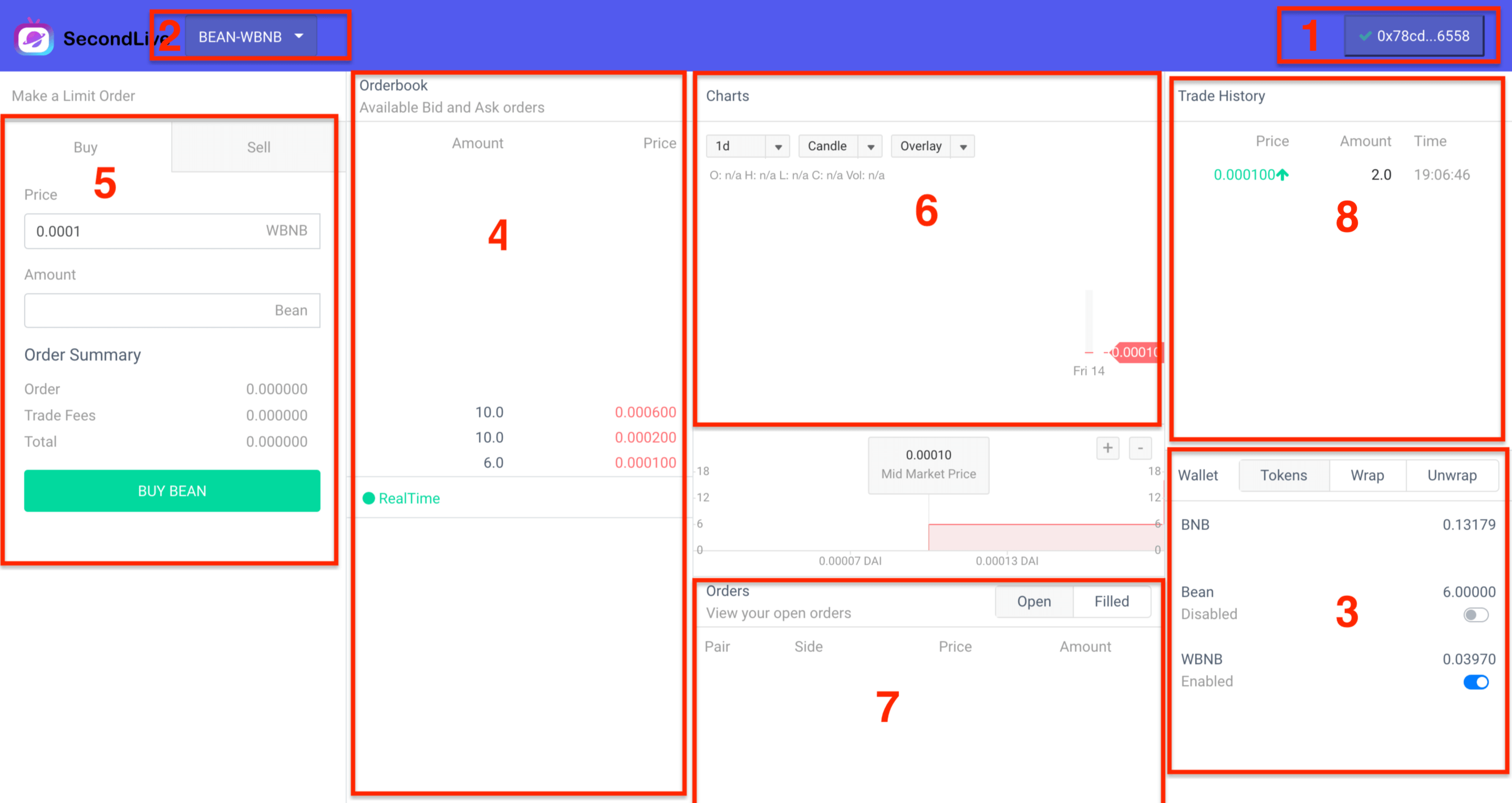
As shown in the figure above, the trading venue is divided into eight parts:
- 1、Wallet management component, through which you can choose the wallet account for transactions, currently support a variety of mainstream wallets, but also support the creation of web wallets (not recommended), recommended the use of ‘MetaMask’ wallet
- 2、Trade pairs to select components, such as the ‘bean-wBNB’ shown in the figure, and the ‘BEAN’ (SecondLive BEAN) and ‘WBNB’ (BNB BEP token wrapper) swaps will be performed
- 3、Account balance component, which can view information about the ‘Token’ balance of the current account and the status of ‘Approve’ authorization under the balance. If the status of ‘Approve’ authorization is open, To place an order using the corresponding ‘Token’, for example, to sell a ‘BEAN’, the ‘BEAN’ must be authorized to place an order. Also, if you are a Taker, you will be charged GAS charges, which are made through the WBNB transfer, ‘WBNB’ can convert ‘BNB’ to ‘WBNB’ through the ‘Wrap’ function, and of course it can convert ‘WBNB’ to ‘BNB’ using the ‘Unwrap’ function
- 4、The order book component displays the list of existing orders to be traded, the upper part is the sell order, the lower part is the buy order
- 5、Transaction component, user order interface, there are ‘buy’ and ‘sell’ two operations, transaction pairs are divided into ‘Base Token’ and ‘Quote Token’, such as’ bean-wbnb ‘, ‘BEAN’ is a Base Token, ‘WBNB’ is’ Quote Token ‘. ‘Buy’ and ‘sell’ are opposite to ‘Base Token’. ‘Buy’ means to buy ‘Base Token’ and sell ‘Quote Token’ at the same time.
- 6、Trade K chart, draw ‘K’ chart based on trade history information
- 7、’Open’ refers to orders placed by the user but not completed or only partially completed (not completed), which the user can cancel at any time without charge. ‘Filled’ refers to transaction orders submitted to the chain
- 8、Transaction history, orders that have been settled on the chain
| If a user places an order that results in an order transaction (for example, there was a 0.1 buy, a second user submits a 0.1 sell, and the second user is’ Taker ‘)
Match Algorithm
The transaction adopts the price-time priority matching strategy, which is matched according to the price matching principle at first. If the prices are the same, match them in chronological order, for example, if a sell order of ‘10’ 0.001bnb and a sell order of ‘20’ 0.003bnb exists, and someone generates a buy order of ‘20’ 0.003bnb, Then ‘10’ will be sold at ‘0.001’ and ‘0.003’ respectively